Fleet Management & Maintenance

Fleet servicing, repairs and parts in one place.

MachineKeep helps mobile mechanics and workshops track customers, machines, services, repairs, parts reference, and parts on order from one shared workspace.

Use it from your phone on-site or your laptop in the office. Invite your team so each person has their own secure login.

🇦🇺 Built in Australia by an Australian🔧 Designed and built by a mobile mechanic

How it works

Up and running in minutes

No training required. No IT department. Just open it on your device and start logging.

01

Set up who you manage

Track your own fleet, your customers' fleets, or both. Create customer profiles only when you need customer-level separation and reporting.

02

Build the fleet records

Add each machine with make, model, serial number, service intervals, and the exact oils and filters it takes.

03

Stay on top of everything

Log services and repairs on the spot, track parts on order, and keep the whole crew on the same data — from any device, on-site.

Features

Everything you need to stay on top of your fleet

Clear screens for daily workshop jobs: customer records, fleet assets, service jobs, repair jobs, parts reference, parts ordering, and finished logs.

👥

Customer + Own Fleet Tracking

Run a customer-based workshop workflow, an internal fleet workflow, or both from the same workspace.

🔧

Service & Repair Logging

Log jobs on the spot with parts used, readings, photos, and your signature. Full history for every machine.

🧑‍🔧

Workshop team logins

Invite links let each mechanic use their own account on the same workshop database — email and password or Google.

🔩

Parts Quick Reference

Store the exact oil type, filter part numbers, and quantities for every machine. No more looking it up at the counter.

📦

Parts on Order Tracking

Track what's been ordered, what's arrived, and what's still outstanding — across your workspace, customers, and machines.

🔐

Secure sign-in

Verified email, password reset, and optional Google — built for real workshop access, not toy demos.

📊

Asset History

Full service and repair history for every machine. Know exactly what was done, when, and what it cost.

📱

Works on Any Device

Use it on your phone on-site, your tablet in the ute, or your laptop in the office.

🔄

Works Offline

No signal at the job? No problem. MachineKeep works offline and syncs automatically when you're back in range.

Inside the app

Know what you are getting before you sign up

Here are real screens from MachineKeep, with private details blurred. The goal is simple: make the work easy to read and fast to update.

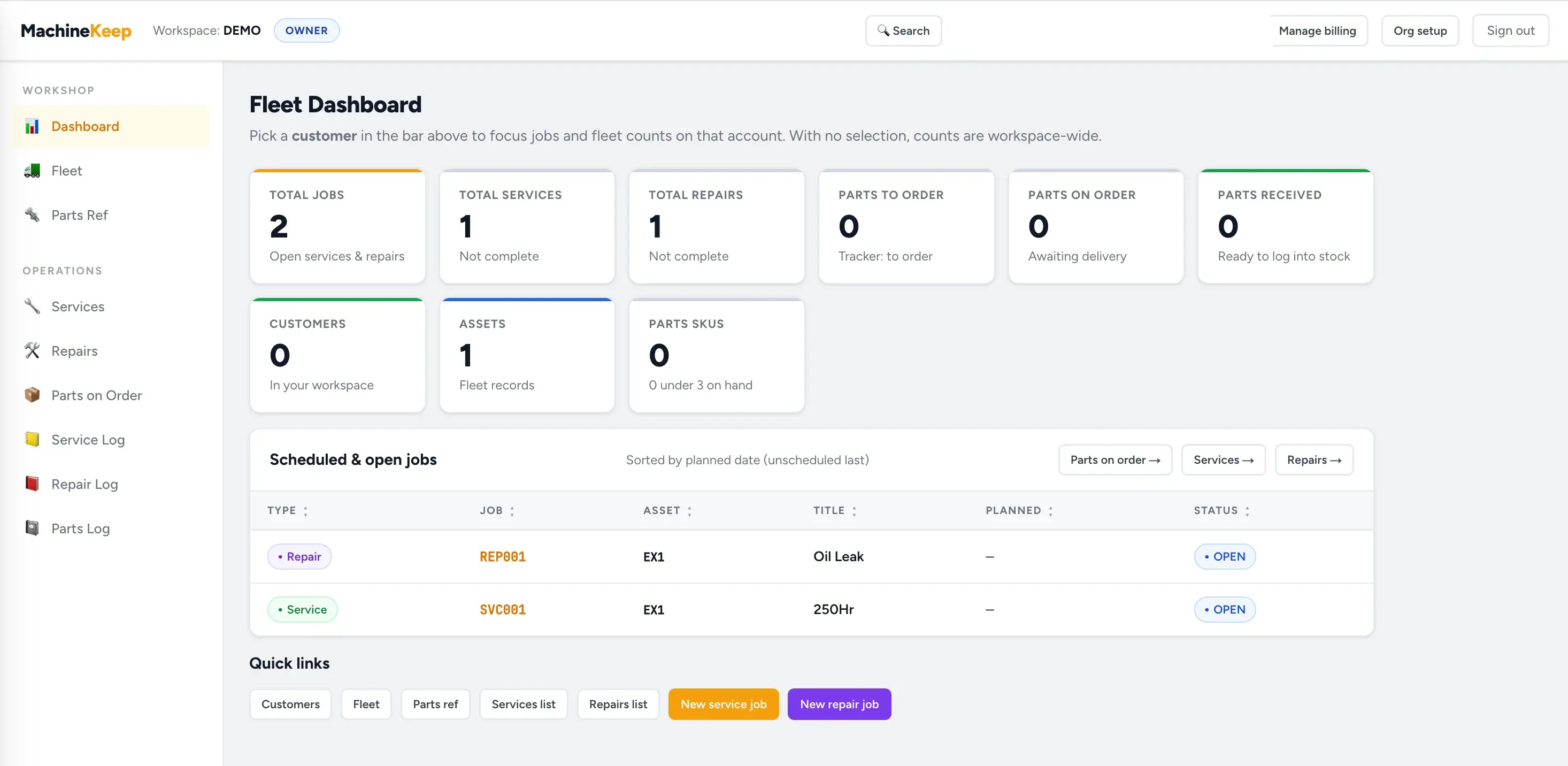
See the whole workshop at a glance

The dashboard shows open services, repairs, parts to order, parts on order, customers, assets, and low stock without digging through spreadsheets.

MachineKeep fleet dashboard showing job totals and quick links

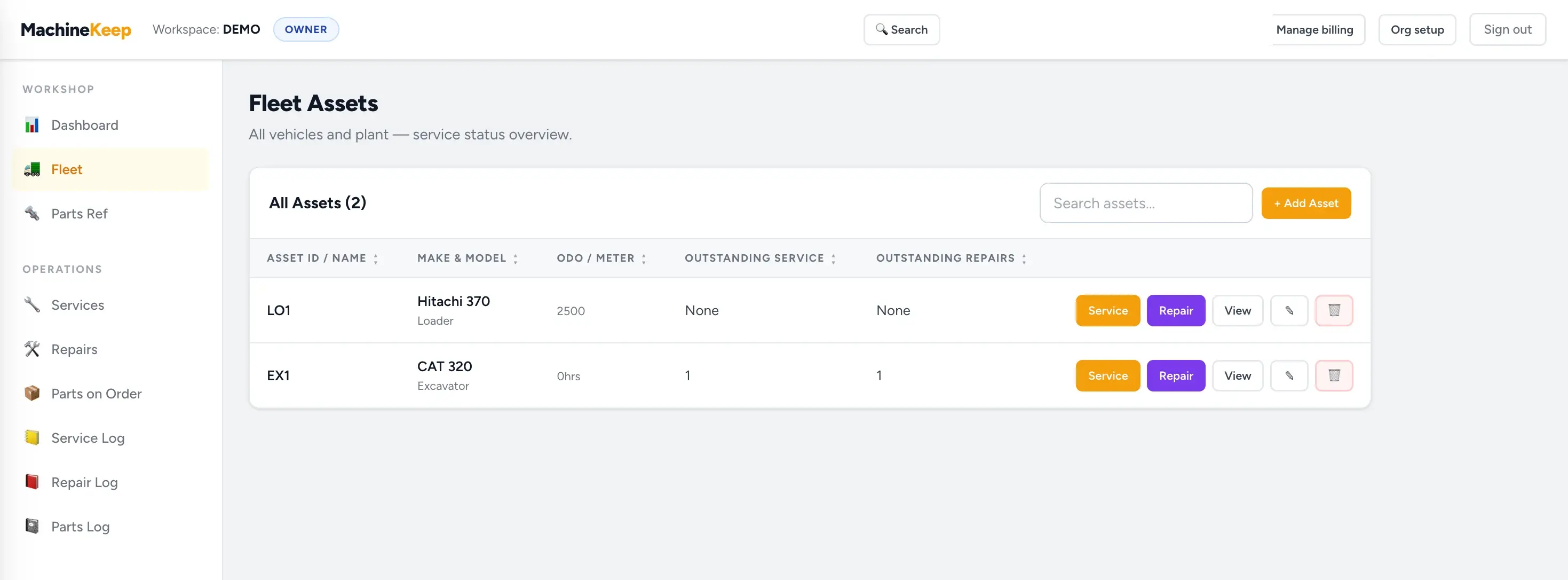
Manage every machine in the fleet

Keep loaders, excavators, trucks, and other plant in one list with meter readings, service status, repair status, and quick actions for new jobs.

MachineKeep fleet assets page showing machines, meter readings, service actions and repair actions

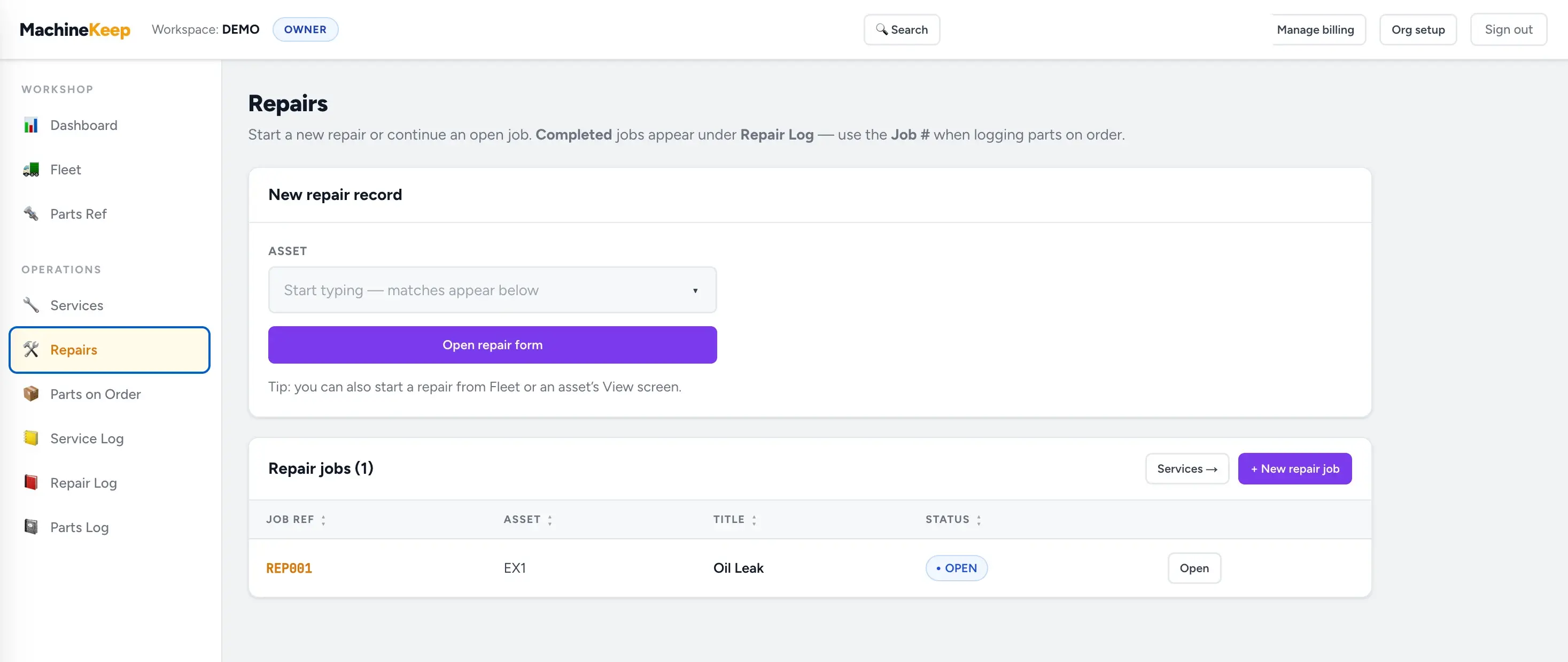
Keep repairs visible until they are finished

Start a repair from the job list or directly from an asset, then track open repair jobs until they move into the repair log.

MachineKeep repairs page showing a new repair form and open repair jobs

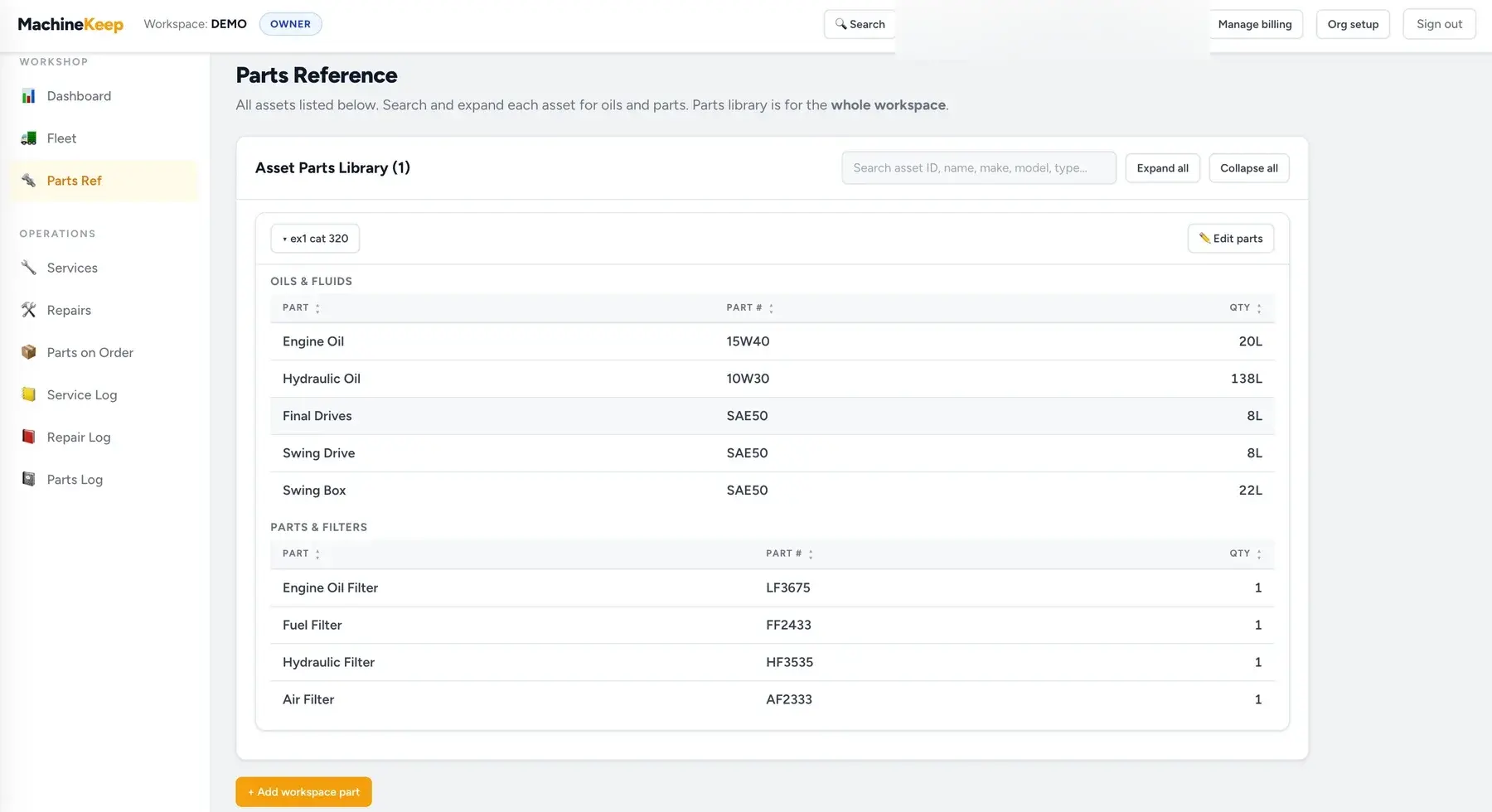
Keep the right oils and filters beside each machine

Store part numbers and quantities against each asset so anyone in the workshop can find the correct parts quickly.

MachineKeep parts reference showing oils, fluids, filters, part numbers and quantities

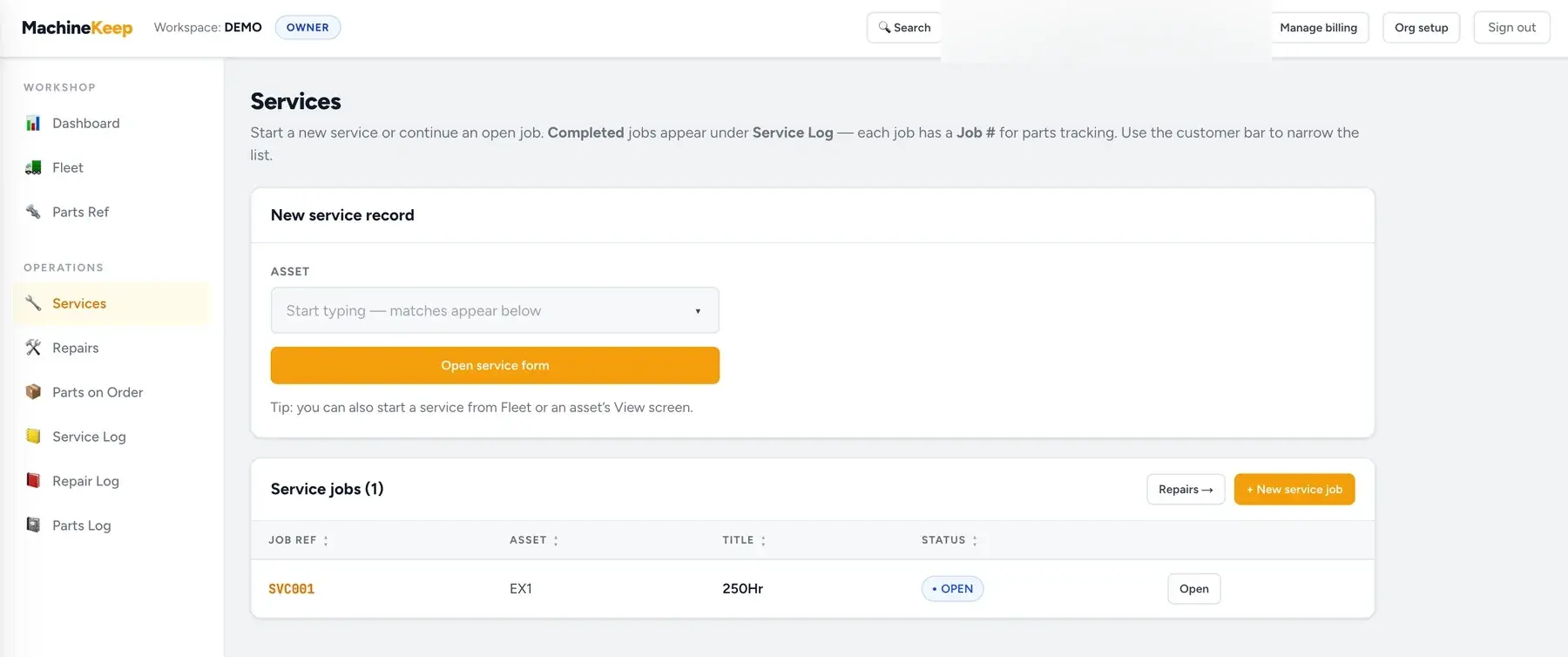
Open services are easy to find

Start a service from an asset, keep open jobs visible, and move finished work into the service log when it is done.

MachineKeep services page showing a new service form and open service jobs

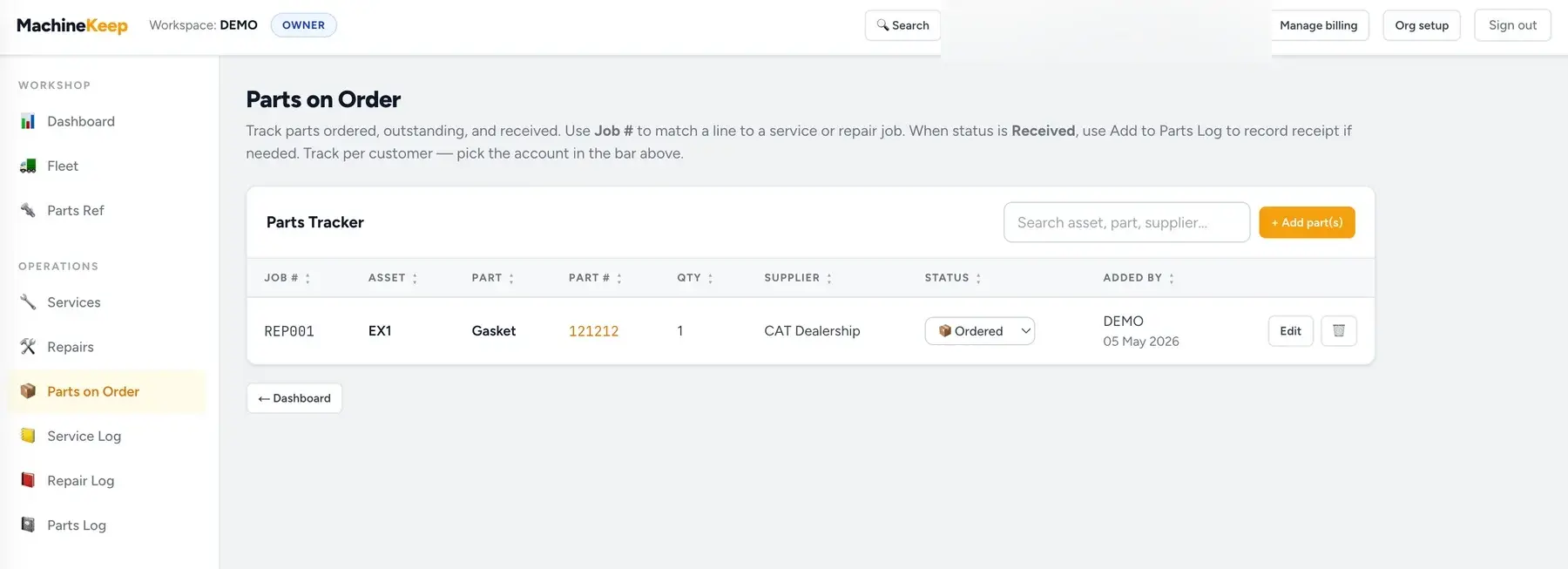
Track parts from order to received

See what has been ordered, which job it belongs to, who supplied it, and whether it has arrived yet.

MachineKeep parts on order tracker showing ordered parts, supplier, status and job number

Built for you

Built from real experience

MachineKeep was built by a mechanic who got tired of tracking customers' machines across spreadsheets, notebooks, and memory. Every feature exists because it was a real problem on a real job — not something designed by a software company guessing at what mechanics need.

  • Mechanics managing multiple customers' machines — mobile or workshop
  • Businesses tracking their own fleet of vehicles and plant equipment
  • Farms managing tractors, headers, sprayers, and other machinery
  • Construction and civil companies keeping equipment service records
  • Anyone who needs every asset, service history, and part in one place

I built this because nothing else existed that worked the way I work. Now I can pull up any machine's full history in 10 seconds, on-site, from my phone.

Pricing

Simple pricing, easy to read

Start with the base workshop plan. Customers and assets are unlimited. Add extra user logins only when more people need their own account.

7-day free trial
Basic Plan
$39/month
or $400/annually
Annual discount
Save $68 per year (15% off vs monthly)
base plan
+$10
per extra user login / month

No card to start. Try it first, then subscribe from Pricing when you are ready.

Included

  • Unlimited customers
  • Unlimited assets per customer
  • Full service & repair logging
  • Team invites — own login per user
  • Parts reference & order tracking
  • Full asset history
  • Works offline, syncs automatically when back in range
  • Works on phone, tablet & desktop
  • Australian support
Try free for 7 days

Coming soon

New plan tier with Operator login

We will soon be releasing a new plan option that includes an Operator login role.

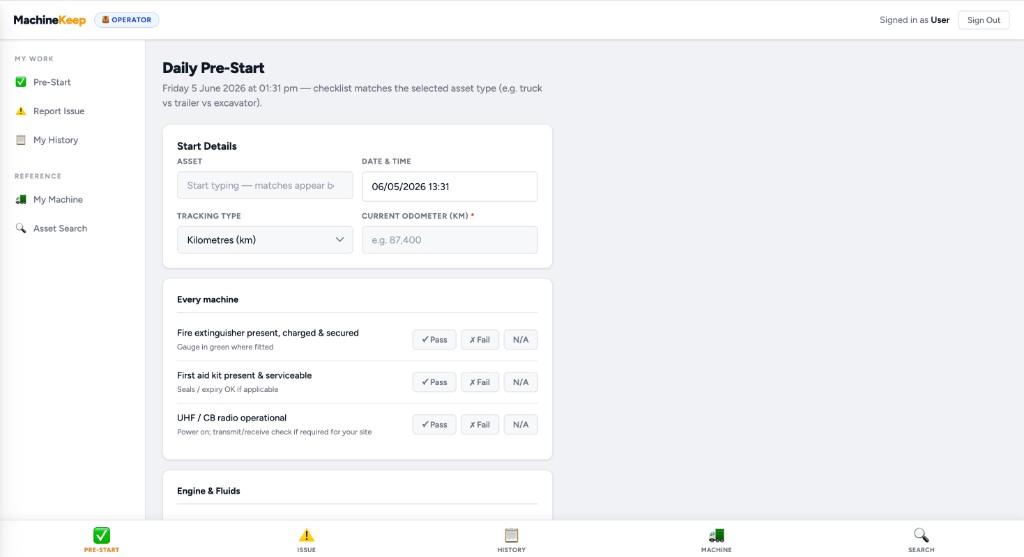
Daily pre-start

Checklists keyed to asset type — complete inspections with pass / fail before the shift.

Operator Daily Pre-Start checklist with asset, odometer, and pass/fail items

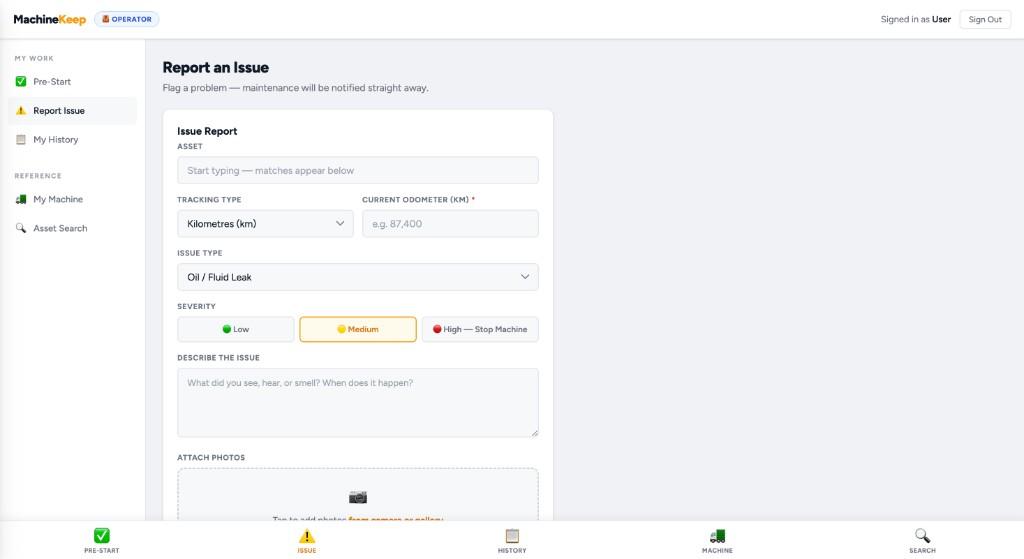
Report an issue

Flag problems in the field with severity, notes, and photos so maintenance is notified straight away.

Operator Report an Issue form with severity, description, and photo attachments

Operator access will include

  • Complete pre-start checklists
  • Submit field issues with notes and photos
  • View asset parts reference on the job
  • Issues reported by operators will appear in the maintenance user dashboard

Start your free trial now

Get 7 days free in the app (no card), then subscribe when you are ready — set up your workshop, invite the crew, and keep every machine's story in one place.

Start your free trial now →

🇦🇺 Built in Australia · Australian support · Your data stays yours